
• Getting Started
    • Signing In
    • Site List
    • Interface Selection
  • Editing Basics
    • Adding Search Boxes
    • Adding a Link
    • Headers and Footers
    • Previewing Changes
    • Viewing Live Site
    • Publishing Changes
    • Adding Social Media
      • Social Media Company Page Button Properties
    • Themes (v4)
      • Customizing Theme Presets
    • Theme, Color Palettes & Buttons (v3)
      • Adding A Logo To Your Menu
      • Adding a Background
      • Changing Default Button Text
  • Images and Files
    • Adding A Background to a Text Block
    • Adding a Photo Gallery
    • Linking to an Image or File
    • Uploading Images and Files
    • Adding an Image to a Page
    • Slideshows
    • Embedding a Video from YouTube
    • Card Component
  • Page Management
    • Spotlight Pages
    • Page Visibility
    • Reordering the Menu
    • Adding a Page
      • Adding A Page - Ideas and Video Walkthroughs
      • Model Pages
      • Supplier Highlights
    • Deleting a Page
    • Editing A Page
      • Adding Notes to a Page
    • Reporting
    • Page Layout
      • Moving Blocks
      • Rows
    • Form Creator
    • Testimonials
    • Agent DNA
    • Destination Pages
    • Destinations
      • Destination Search
    • Blog
  • Travel Content
    • FInding Offer IDs
    • Target Searches
    • Offer Groups
      • Offer Group Displays
    • Offer Detail Page
    • Adjusting Supplier Preferences
  • Lead Management
    • Email Subscription Contact Information
    • Creating Agent Accounts
    • Newsletter Signup
  • Consent Tools
    • CCPA
    • GDPR
    • Compliance Reports
  • SEO Help
  • Commissionable Partners
    • Supplier Booking Integration
    • Additional Revenue Opportunities
  • Getting Started
    • Signing In
    • Site List
    • Interface Selection
  • Editing Basics
    • Adding Search Boxes
    • Adding a Link
    • Headers and Footers
    • Previewing Changes
    • Viewing Live Site
    • Publishing Changes
    • Adding Social Media
      • Social Media Company Page Button Properties
    • Themes (v4)
      • Customizing Theme Presets
    • Theme, Color Palettes & Buttons (v3)
      • Adding A Logo To Your Menu
      • Adding a Background
      • Changing Default Button Text
  • Images and Files
    • Adding A Background to a Text Block
    • Adding a Photo Gallery
    • Linking to an Image or File
    • Uploading Images and Files
    • Adding an Image to a Page
    • Slideshows
    • Embedding a Video from YouTube
    • Card Component
  • Page Management
    • Spotlight Pages
    • Page Visibility
    • Reordering the Menu
    • Adding a Page
      • Adding A Page - Ideas and Video Walkthroughs
      • Model Pages
      • Supplier Highlights
    • Deleting a Page
    • Editing A Page
      • Adding Notes to a Page
    • Reporting
    • Page Layout
      • Moving Blocks
      • Rows
    • Form Creator
    • Testimonials
    • Agent DNA
    • Destination Pages
    • Destinations
      • Destination Search
    • Blog
  • Travel Content
    • FInding Offer IDs
    • Target Searches
    • Offer Groups
      • Offer Group Displays
    • Offer Detail Page
    • Adjusting Supplier Preferences
  • Lead Management
    • Email Subscription Contact Information
    • Creating Agent Accounts
    • Newsletter Signup
  • Consent Tools
    • CCPA
    • GDPR
    • Compliance Reports
  • SEO Help
  • Commissionable Partners
    • Supplier Booking Integration
    • Additional Revenue Opportunities
  • Getting Started
    • Signing In
    • Site List
    • Interface Selection
  • Editing Basics
    • Adding Search Boxes
    • Adding a Link
    • Headers and Footers
    • Previewing Changes
    • Viewing Live Site
    • Publishing Changes
    • Adding Social Media
      • Social Media Company Page Button Properties
    • Themes (v4)
      • Customizing Theme Presets
    • Theme, Color Palettes & Buttons (v3)
      • Adding A Logo To Your Menu
      • Adding a Background
      • Changing Default Button Text
  • Images and Files
    • Adding A Background to a Text Block
    • Adding a Photo Gallery
    • Linking to an Image or File
    • Uploading Images and Files
    • Adding an Image to a Page
    • Slideshows
    • Embedding a Video from YouTube
    • Card Component
  • Page Management
    • Spotlight Pages
    • Page Visibility
    • Reordering the Menu
    • Adding a Page
      • Adding A Page - Ideas and Video Walkthroughs
      • Model Pages
      • Supplier Highlights
    • Deleting a Page
    • Editing A Page
      • Adding Notes to a Page
    • Reporting
    • Page Layout
      • Moving Blocks
      • Rows
    • Form Creator
    • Testimonials
    • Agent DNA
    • Destination Pages
    • Destinations
      • Destination Search
    • Blog
  • Travel Content
    • FInding Offer IDs
    • Target Searches
    • Offer Groups
      • Offer Group Displays
    • Offer Detail Page
    • Adjusting Supplier Preferences
  • Lead Management
    • Email Subscription Contact Information
    • Creating Agent Accounts
    • Newsletter Signup
  • Consent Tools
    • CCPA
    • GDPR
    • Compliance Reports
  • SEO Help
  • Commissionable Partners
    • Supplier Booking Integration
    • Additional Revenue Opportunities

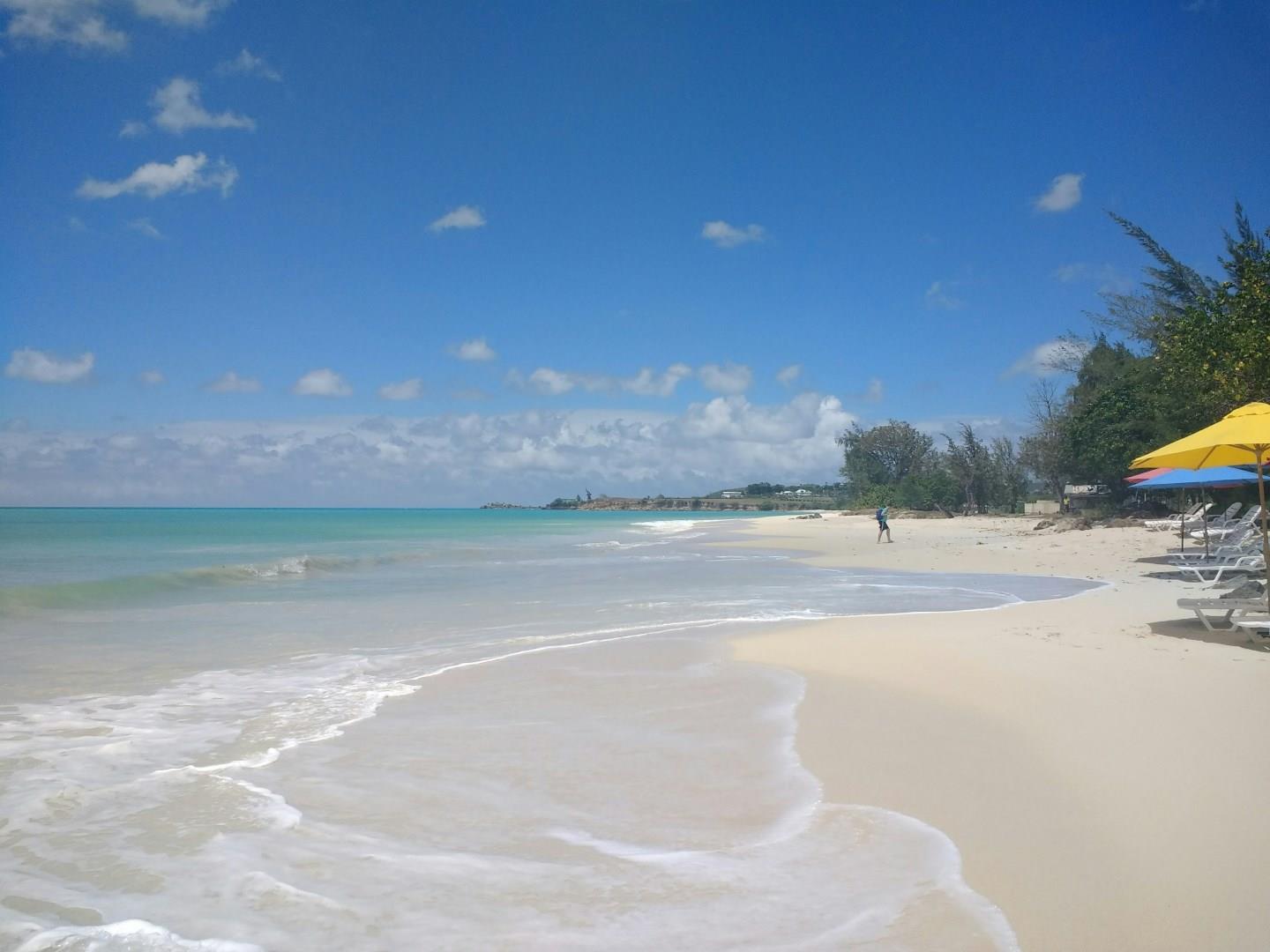
Fort James Beach

Slideshow Placeholder
 Photo Credit: Kelcie Papp
Photo Credit: Kelcie Papp
 Photo Credit: Kelcie Papp

Fort James Beach, just outside St. John’s in Antigua, is a long stretch of soft white sand framed by calm, turquoise waters. The beach takes its name from nearby Fort James, a historic 18th-century British stronghold built to guard the harbor. While only ruins of the fort remain, its presence adds a layer of heritage to this otherwise idyllic Caribbean shoreline.

The beach is popular with both locals and visitors for its relaxed atmosphere, making it a favorite spot for swimming, sunbathing, and enjoying the gentle surf. A few casual beach bars and restaurants line the shore, offering fresh seafood, cold drinks, and stunning sunset views. The open expanse of sand provides plenty of space to unwind, whether for a quiet stroll or a leisurely day by the water.

Blending history with natural beauty, Fort James Beach offers a laid-back experience where Antigua’s past and present meet against a backdrop of sea and sky.

Placeholder


Placeholder


NexCite Help
Phone: 503-626-7766 Option 2 - Email: support@vacationport.com